

OpenAI Embeddings API Application and Usage
OpenAI Embeddings service, used to generate embedding vectors representing input text.
This document mainly introduces the usage process for OpenAI Embeddings API operations. With it, we can create embedding vectors representing input text.
¶ Application Process
To use the OpenAI Embeddings API, first go to the jiasmart Console to obtain your API Token and keep it for later use.
If you have not logged in or registered yet, you will automatically be redirected to the login page and prompted to register and log in. Once completed, you will automatically return to the current page.
One API Token is sufficient to access all services on the platform; there is no need to apply separately for each service. A free quota will be granted upon the first application, allowing you to try the service for free. When the quota is insufficient, you can recharge your general balance in the Console.
📘 Complete Documentation: OpenAI Embeddings API →
¶ Basic Usage
Next, you can fill in the corresponding information in the interface, as shown below:
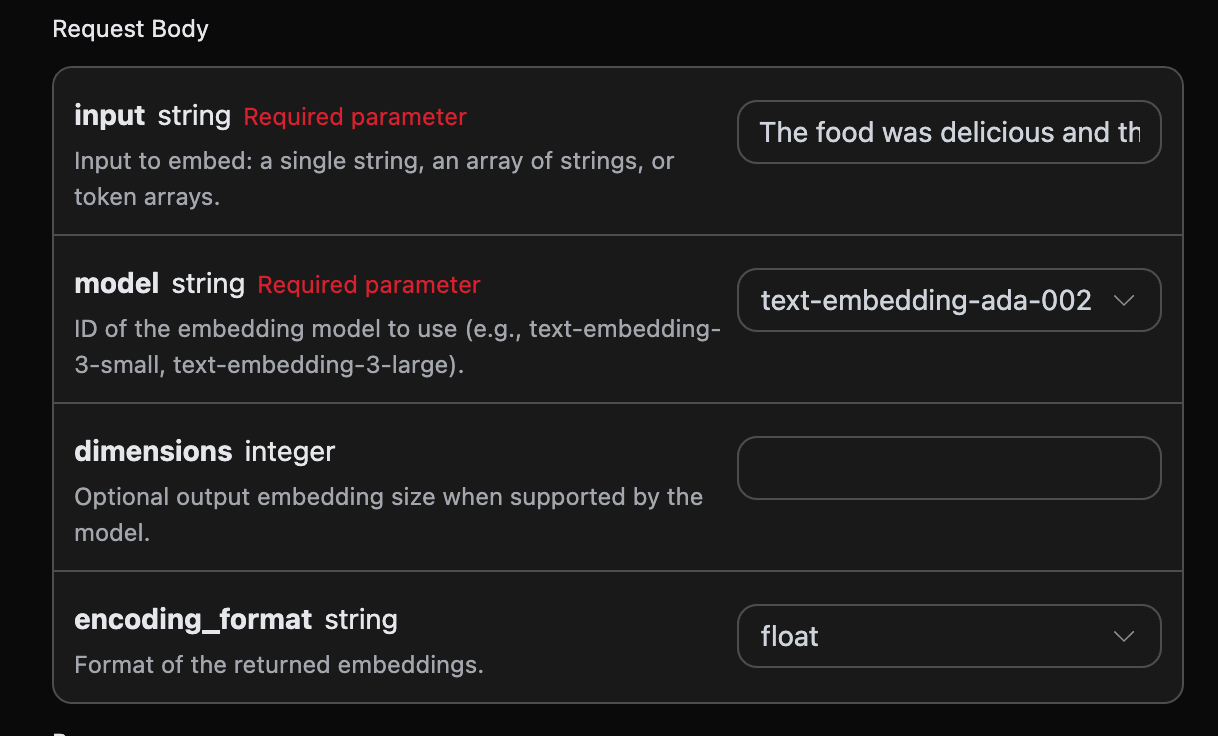
When using this API for the first time, we need to fill in at least three fields. One is authorization, which can be selected directly from the dropdown list. Another parameter is model, which is the OpenAI official model category we choose to use. The currently available models are text-embedding-3-small and text-embedding-3-large. text-embedding-ada-002 has been discontinued; if existing vector indexes use this old model, their vectors cannot be directly mixed with vectors from the new models, and the indexes need to be rebuilt. The last parameter is input, which is the text that we need to convert into embedding vectors.
The basic rate per million input tokens is 0.027993 Credits for text-embedding-3-small and 0.181957 Credits for text-embedding-3-large. The default vector dimensions are 1536 and 3072, respectively. If large-batch or token ID input for small is temporarily unavailable, you can submit the original text and split it into batches of up to 512 entries each, continuing to use the same model and dimensions.
At the same time, you can notice that the corresponding API call code is generated on the right. You can copy the code and run it directly, or click the "Try" button to test it.
Optional parameters:
dimensions: Truncates the vector dimensions. By default, the full dimensions are returned.encoding_format: Return format. Available options arefloatorbase64.
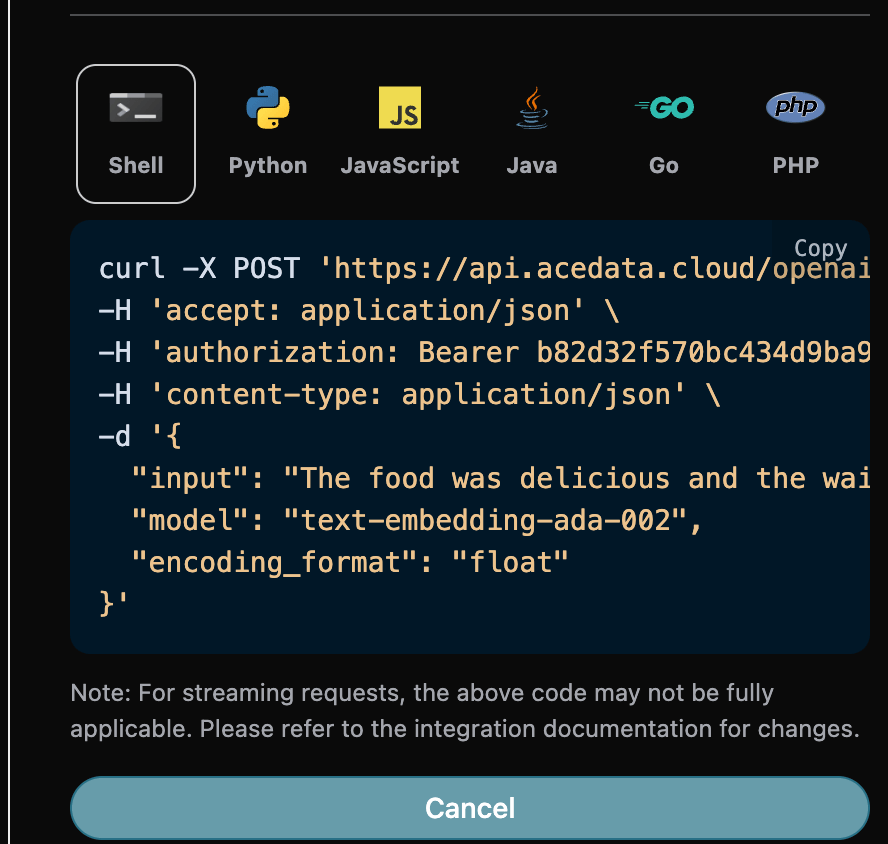
Python sample API call code:
import requests

url = "https://api.acedata.cloud/openai/embeddings"

headers = {
    "accept": "application/json",
    "authorization": "Bearer {token}",
    "content-type": "application/json"
}

payload = {
    "input": "The food was delicious and the waiter...",
    "model": "text-embedding-3-small",
    "encoding_format": "float"
}

response = requests.post(url, json=payload, headers=headers)
print(response.text)
After making the API call, we find that the returned result is as follows:
{
  "object": "list",
  "data": [
    {
      "object": "embedding",
      "index": 0,
      "embedding": [
        0.0022756963,
        -0.009305916,
        0.015742613,
        -0.0077253063,
        -0.0047450014,
        0.014917395,
        -0.009807394,
        -0.038264707,
        -0.0069127847,
        -0.028590616,
        0.025251659,
        ....
        -0.014079482,
        -0.015425222,
        0.0040753055,
        0.002727979,
        -0.03138366,
        0.041159317,
        -0.017608874,
        -0.018637223,
        0.014587308,
        0.010486611,
        -0.015387135,
        -0.019424353,
        -0.002800979
      ]
    }
  ],
  "model": "text-embedding-3-small",
  "usage": {
    "prompt_tokens": 8,
    "total_tokens": 8
  }
}
The returned result contains multiple fields, which are described as follows:
model: The model used for converting the text into embedding vectors in this request.usage: The token information used for converting the text into embedding vectors in this request.data: The embedding vector results after text conversion.
Among these, data contains the specific information about the embedding vectors corresponding to the text, and its embedding field contains the specific embedding vector results generated.
¶ Error Handling
When calling the API, if an error occurs, the API will return the corresponding error code and information. For example:
400 token_mismatched: Bad request, possibly due to missing or invalid parameters.400 api_not_implemented: Bad request, possibly due to missing or invalid parameters.401 invalid_token: Unauthorized, invalid or missing authorization token.429 too_many_requests: Too many requests, you have exceeded the rate limit.500 api_error: Internal server error, something went wrong on the server.
¶ Error Response Example
{
  "success": false,
  "error": {
    "code": "api_error",
    "message": "fetch failed"
  },
  "trace_id": "2cf86e86-22a4-46e1-ac2f-032c0f2a4e89"
}
¶ Conclusion
Through this document, you have learned how to easily use the official OpenAI embedding generation functionality through the OpenAI Embeddings API. We hope this document will help you better integrate and use this API. If you have any questions, please feel free to contact our technical support team.